
Building Quote Template UK: Itemised Example & Checklist
A clearer scope, an itemised breakdown and a reusable Word documentA clearer building quote starts with the work, not just the total. Use our editable template to record the measured scope, separate materials and labour, and make allowances and exclusions easy to find.
Designed for builders preparing their own quotation, with a worked example that also helps homeowners compare what is included.
Two reusable pages and one fictional example. Manually editable; not an automatic pricing tool or a legally reviewed contract.
Define the work
Record the site, specification and measured work packages before entering prices.
Show the breakdown
Keep materials, labour, other costs and VAT treatment visible.
Explain the limits
List provisional work, exclusions and the record of agreed changes.
In this guide
Get the building quote template
The Word document has space for your business and client details, quotation reference, scope, quantities, cost breakdown, allowances, exclusions and change notes. Replace the placeholders with your own details and remove the example page before sending it to a customer.
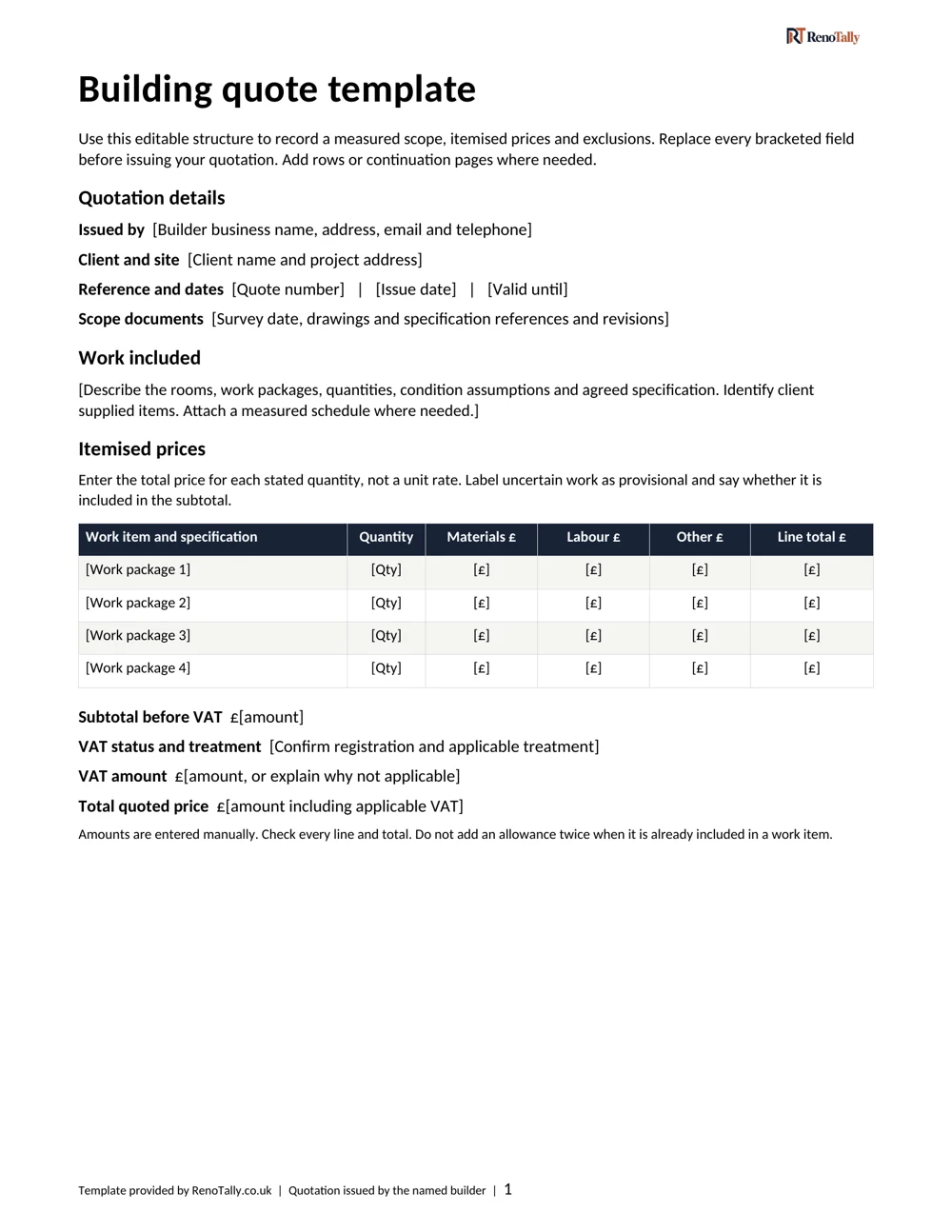
The actual draft’s first page. The small, approved logo remains at the top right. The document includes two reusable pages and a separate example page.
Record the scope before entering prices
Start with the quotation number, date, validity period, project address and the person issuing the quotation. Reference the survey date and the version of any drawings or specification used. A later drawing revision should not be mistaken for the work originally priced.
Break the job into recognisable work packages. “Refurbish room” leaves important questions unanswered; protection and removal, wall repairs, floor finish and decoration can each have a measured quantity and a clear description.
- Record quantities and units alongside the relevant specification.
- State who supplies the materials and which product or finish is being priced.
- Include agreed access, disposal and making-good work, or list what is excluded.
- Identify work that needs further investigation instead of hiding it inside a general total.
Our planning tools for builders help organise the early scope. Your issued quotation still needs your own measurements, prices and project-specific checks.
Worked example: a limited room refurbishment
This fictional example covers a non-structural refresh of one room: 20m² of floor finish and 50m² of wall preparation and decoration. The figures demonstrate the document, not typical market rates or a price for your project.
| Work package | Materials | Labour | Other | Total |
|---|---|---|---|---|
| Protection and waste | £80 | £220 | £100 | £400 |
| Strip-out | £0 | £300 | £150 | £450 |
| Minor wall repairs | £180 | £720 | £0 | £900 |
| Floor finish | £600 | £500 | £0 | £1,100 |
| Wall preparation and decoration | £180 | £620 | £0 | £800 |
| Subtotal before VAT | £3,650 | |||
The issuer must confirm the applicable VAT treatment, VAT amount and final quoted total. The example deliberately does not impose a VAT rate or present an unconfirmed final customer price.
In the example, £150 for local patch repairs is already included in the £900 wall-repair line. Adding it to the subtotal again would count the same allowance twice.
Keep allowances, exclusions and changes separate
An allowance should say what it covers and whether it is included in the quoted subtotal. If the underlying condition is unknown, describe the uncertainty and what further inspection is needed. Do not make a provisional amount look like a confirmed scope or a second contingency.
Included allowance
£150 for local patch repairs is within the £900 wall-repair line. It is not added again.
Excluded work
Structural alterations and electrical work are outside this example. They are not covered by its subtotal.
Write exclusions plainly. Where relevant, address client-supplied products, concealed defects, specialist design, approvals, service alterations and extra making good. The list must describe the actual project rather than automatically excluding everything in a standard paragraph.
Use the change record for the description, reference, price and programme effect of a proposed change. Keep the updated scope traceable to the original quotation and use suitable project terms for how changes are agreed. This template is not a substitute for a building contract.
Ready to record your own scope, allowances and exclusions? Request the editable Word template using the email form above.
Compare the scope, not only the headline price
Two quotations are not directly comparable if one includes preparation and disposal while the other leaves them unresolved. Ask for the missing detail before treating the lower total as the lower cost for the same job.
| Check | Quotation A | Quotation B |
|---|---|---|
| Preparation | Listed work and allowance | Not specified — ask |
| Waste removal | Included in the breakdown | Excluded — price separately |
| VAT | Treatment and amount confirmed | Unclear — confirm before comparing |
For detailed material-specific checks, use our existing flooring quote checklist or tiling quote outline. This building template covers the wider work-package structure rather than replacing those guides.
Use the right tool for the next step
A planning estimate helps you explore the budget before a contractor has priced the actual work. It is not a surveyed quotation, technical assessment or fixed-price offer.
For early cosmetic or moderate renovation planning, try our house renovation cost calculator. Our house renovation cost guide explains broader budget assumptions.
Preparing a quotation? Use this Word template. Comparing quotations you have received? RenoTally Pro has a three-trade quote-comparison sheet and budget tools. It is a separate product; this template does not replace it or change what the pack includes.
Check the document before issuing it
- Replace every placeholder and confirm the issuer, customer and project references.
- Check the measured scope, specification and who supplies each material.
- Recalculate the manually entered line totals and subtotal.
- Confirm VAT treatment and the final quoted total.
- Check that included allowances appear once, and that exclusions are clear.
- Confirm programme assumptions, payment details and suitable terms.
- Remove the worked-example page and check the final document before sending it.
Common building quote template questions
Can I edit the template in Word?
Yes. The draft is an editable Word document with text and tables. Enter the quantities and amounts yourself; it does not calculate totals automatically.
Is this the same as a builders estimate template?
The fields can help organise an early estimate, but label the document to match what you are actually providing. State the scope, assumptions and status clearly; changing the heading alone does not establish suitable terms.
Can a homeowner use it?
Yes, as a checklist for understanding an itemised proposal. The builder remains responsible for their own quotation, surveyed work, prices and suitable documentation.
Is it a construction contract?
No. It is a practical quotation structure, not a legally reviewed contract or project-specific legal, tax or technical advice.
Will requesting it sign me up to marketing?
The proposed form requests your email for template delivery only. It does not automatically enrol you in marketing. The live form and delivery system have not been activated.
Sources and methodology
The template and fictional example were created for RenoTally. The example demonstrates arithmetic and scope recording, not a survey of market prices, a live offer or a calculator-generated quotation. Read how our estimates work for the limits of the separate planning tools.
Preparing your own quotation? Get the editable Word template, with two reusable pages and a separate fictional worked example.